AutoStream Download

Play your games. Keep the good bits.

AutoStream finds kills in supported games and interesting moments in your recordings. Turn them into clips, song reels and full highlight videos.

Real example from YuvaNeta's stream

  1. The killFrom your recording
  2. FoundNamed and listed
  3. Song reelCut to the beat
  4. HighlightYour face, with captions
  5. ReadyClips, Shorts, videos
Made by AutoStream from one evening of Valorant, shortened for this page. No sound.
  • Free
  • Open source
  • No account
  • Your recordings stay on your PC

On a Mac? Clips and song reels work there too. See the Mac download.

One recording. Four ways to use it.

Start with any video of you playing. You do not need to have streamed it.

Auto clipper Start here

Every good play, ready to share.

Give it a recording. It finds your kills and big reactions, and cuts each good play into its own short video. It makes a vertical version too, ready for YouTube Shorts, Instagram Reels and TikTok.

It shows you everything it found before it cuts, so you can drop a bad one.

Make clips from a recording
A clip it cut and named: 4 kills
The vertical version

Song reels

Your kills. On the beat.

Pick a song and a style. AutoStream cuts your kills so each one lands on a beat. Add slow motion, speed changes, song lyrics when available, and your facecam if you want.

Styles include Hype, Velocity, Clean and Chaos. Use a song file you have, or paste a YouTube link.

Make a song reel
Hype
Velocity, with the camera on top

Stream highlights

Your stream's best moments, edited into a video.

It finds your best fights and your loudest reactions, keeps what you were saying around them, cuts the waiting, and zooms in on your face when you react.

For Valorant streams. Optional English and Hinglish captions · currently needs a supported NVIDIA graphics card.

Make a stream highlight
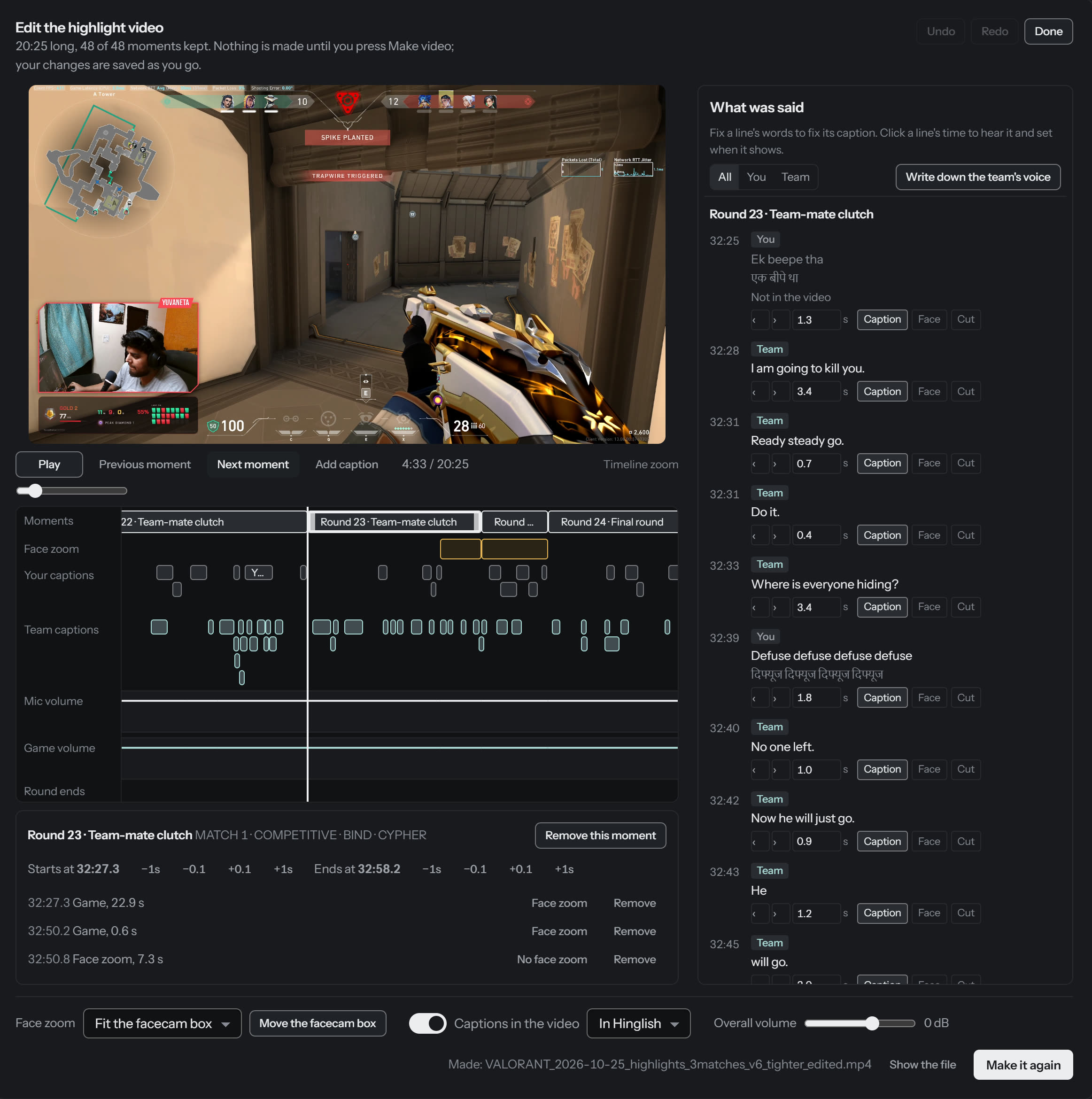
From a 20-minute highlight of one evening: the round ends, the camera moves to the face, the caption follows.

Automatic live and record (optional, Windows)

Start playing. Your stream can start too.

Open a game and AutoStream can go live and record it for you, then stop when you do.

How that works

You play. AutoStream does the sorting.

Three steps, and the first one is playing.

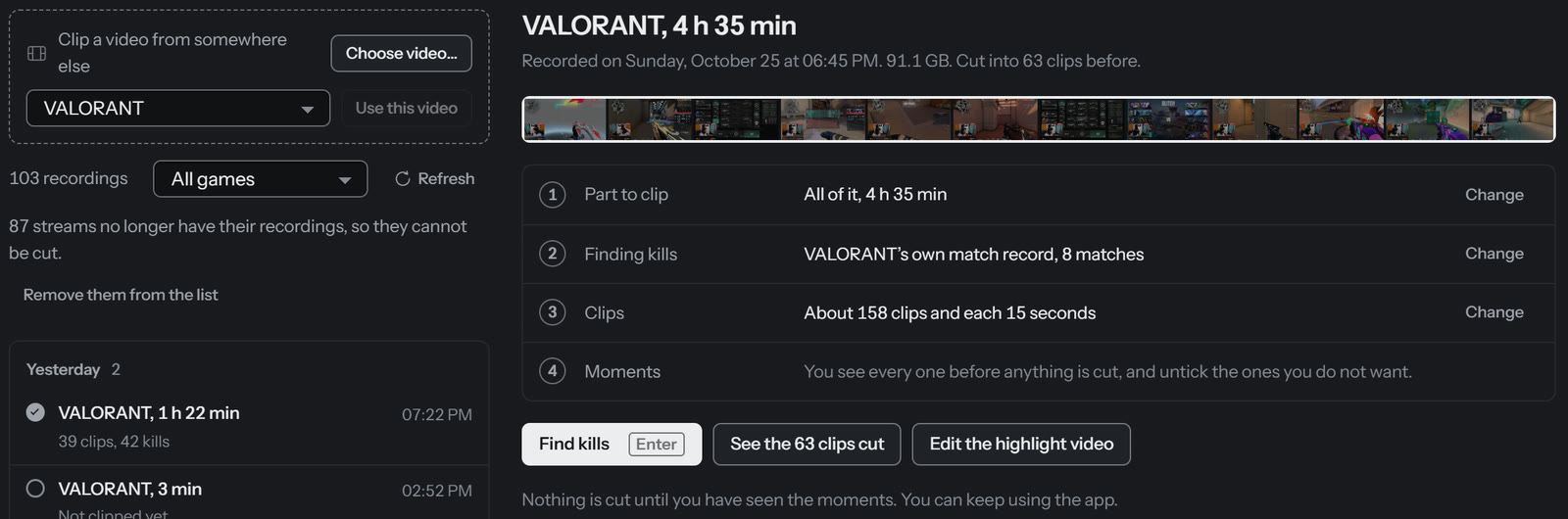
  1. Play, or pick a recording

    Any video of your game works, even an old one. You do not need to have streamed.

    AutoStream's Clips page with a 4 hour 35 minute Valorant recording picked, and a button to choose any other video
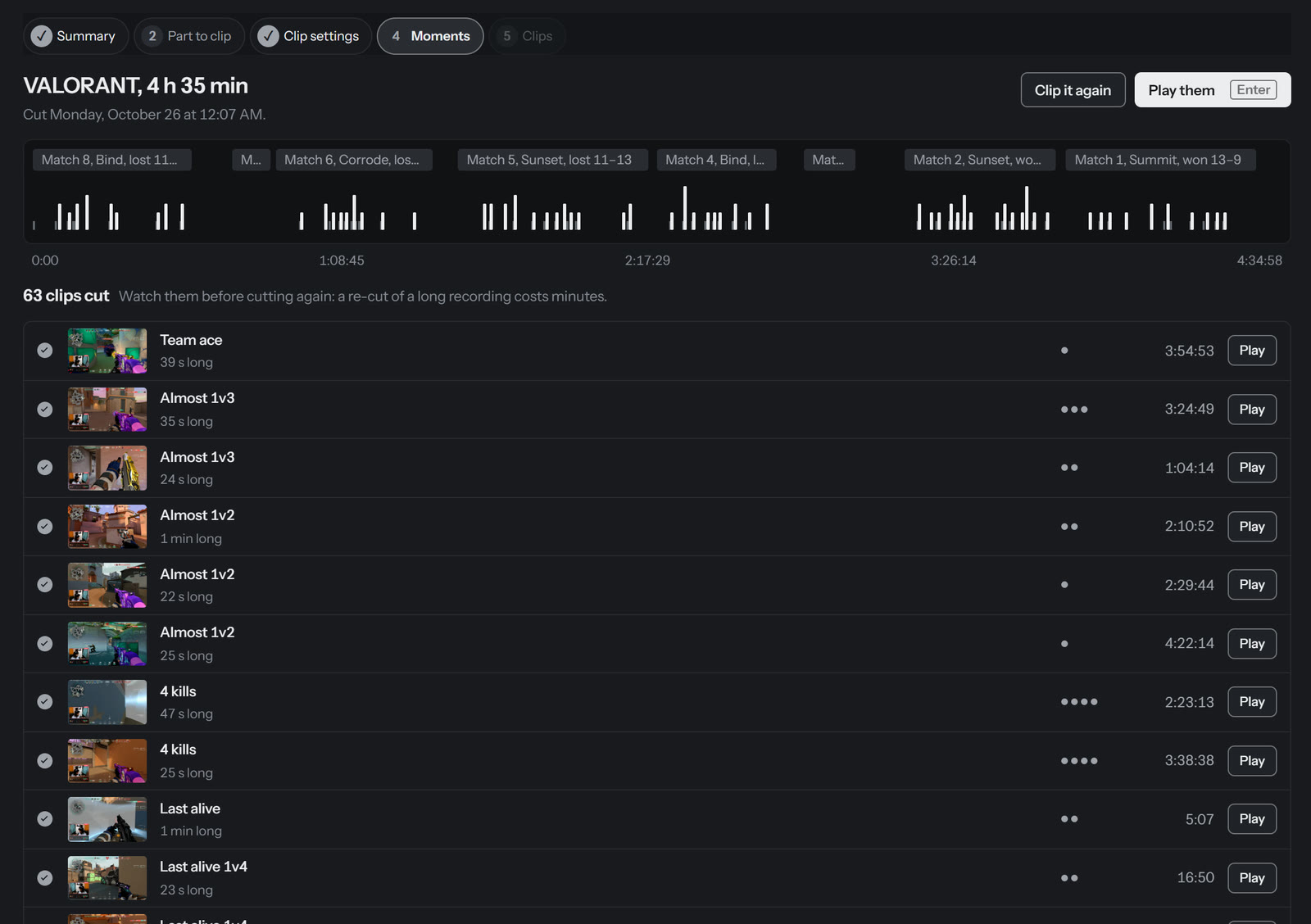
  2. See what it found

    Every kill, clutch and close call, on one timeline. Watch any of them, untick the ones you don't want.

    The moments AutoStream found in the recording: a timeline of kills across eight matches and a list named Team ace, Almost 1v3, 4 kills, Last alive
  3. Make clips, reels or a highlight

    Choose what you want made. Change anything you don't like in the editor afterwards.

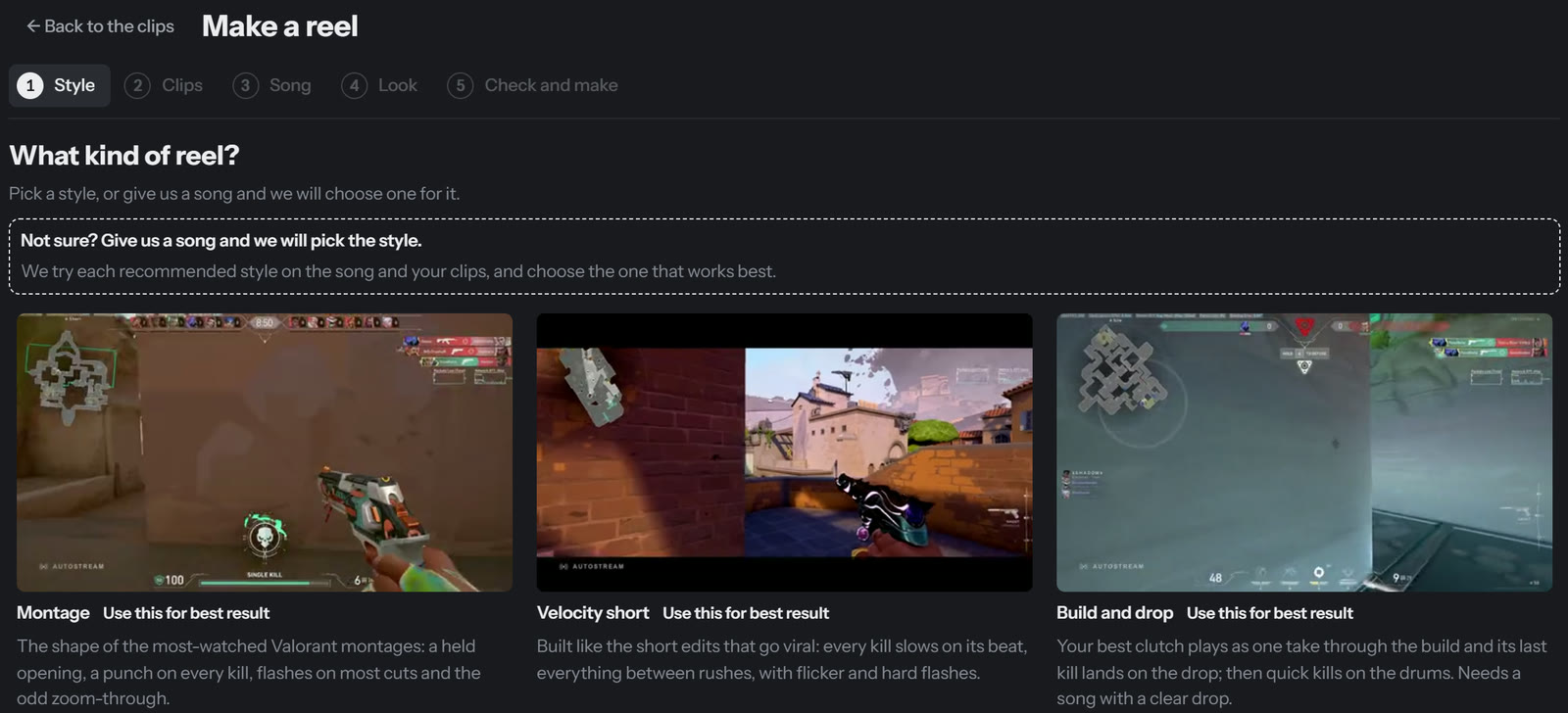
    The reel maker's first step: pick a style, with a preview of each one

One real evening

4h 35mrecorded

63 clipscovering 95 kills

20 minof highlights from 3 matches

Actual example, not a guaranteed result.

Don't take our word for it. Watch the edits.

Everything here was made by AutoStream from the developer's own games, then shortened for this page.

HypeFast and loud, a cut every couple of beats.
VelocityEach kill slows on its beat, the rest rushes.
CleanCalm: long shots, almost no effects.
ChaosEverything at once. Loud on purpose.

Don't like a moment? Change it.

The highlight editor: the video on top, a row of moments, face zooms, captions and volume underneath, and everything that was said on the right
The highlight editor, open on the video above. Click to enlarge
  • Remove a momentDrag its edges to trim it, or take it out. It stays greyed out so you can bring it back.
  • Zoom on your faceDraw the zoom for as long as you want it.
  • Fix a captionChange the words, move it, or hide it.
  • Set the volumeYour voice and the game each get their own line you can raise or lower.

AutoStream makes the first edit. You decide what stays.

Nothing is made until you press Make video, and the original is never changed.

Reels open on a timeline too

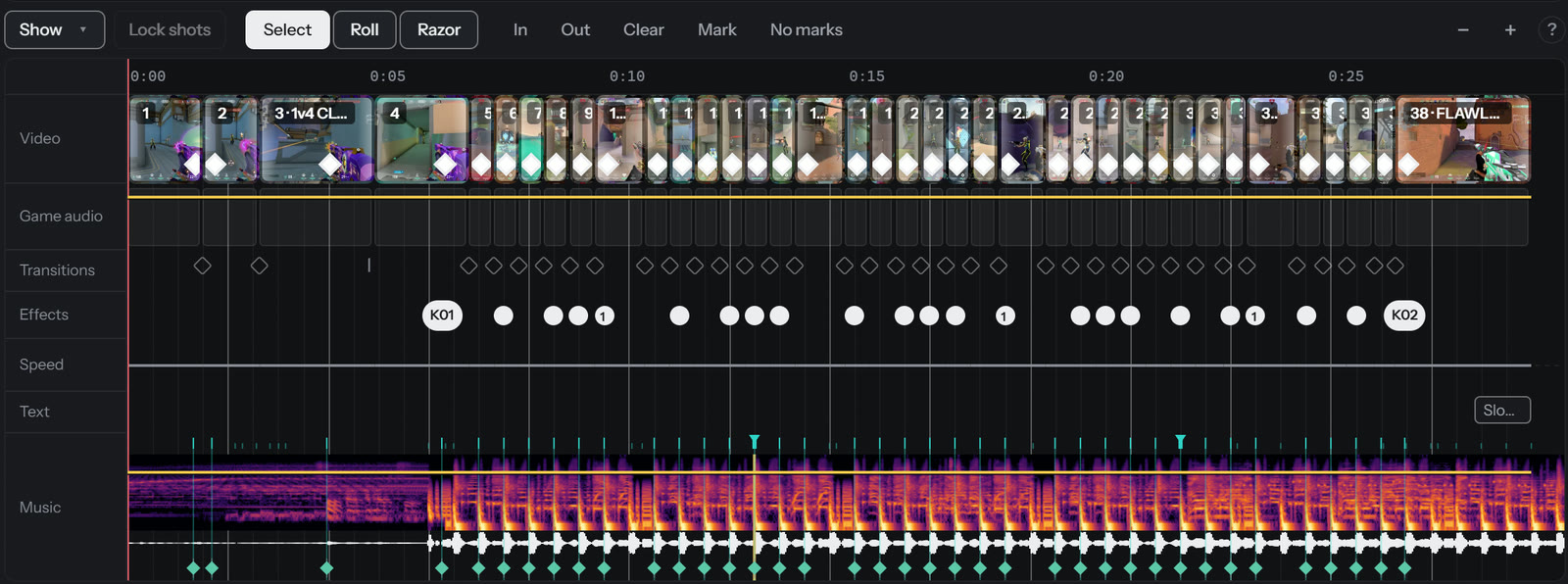
Move a shot, trim it, change its effect. The song is drawn underneath with every kill marked, so you can see each one land on the beat.

Edit a reel
A reel's timeline: shots in a row with their kills marked, effects, and the song drawn as a colourful picture of its sound with every beat marked

Works with the games you play.

Valorant
Finds your kills from the match info, including multi-kills and clutches. Keep AutoStream open while you play so it can save that info.
Counter-Strike 2
Finds your kills in the recording. Save the match replay in the game and it can also name rounds, clutches and kills through smoke.
Marvel Rivals
Finds the moments of each match and makes a video of it with the waiting removed.
Delta Force
Finds your kills. No setup.
Other games
Show it one example kill. Or let it find the loud moments in your recording. Those are labelled moments, not kills.

How does AutoStream find my moments?

Want AutoStream to handle going live too?

You don't need this to make clips. But if you stream, AutoStream can do the boring part: open a game and it starts your stream on YouTube, Twitch or Kick, names it after the game, records it, and ends it when you stop playing.

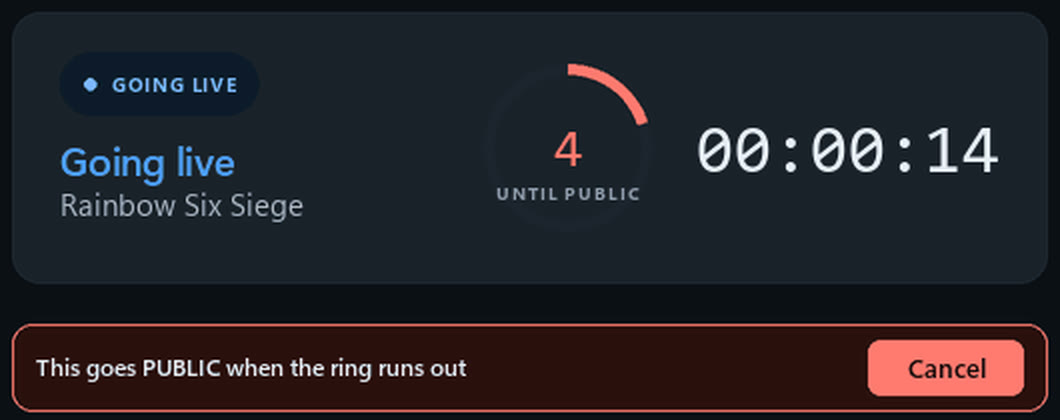
Every stream starts private, with a 20-second countdown and a Cancel button, so nothing goes public by surprise.

Windows only. You set it up once, in about 15 minutes.

Set up automatic streaming
AutoStream holding a new stream private: a ring counting down 4 seconds until public, and a Cancel button
The countdown before a stream goes public, from an earlier version of the app.

Your recordings stay yours.

  • Free and open sourceNo paid version, no trial. Anyone can read the code on GitHub.
  • No accountNothing to sign up for. Download it and use it.
  • Files stay on your PCRecordings, clips and reels are saved in your Videos folder. Nothing is uploaded, and AutoStream never deletes a recording.
  • No AutoStream serverThere is nothing of ours for your videos to go to.

It only goes online for what you ask of it: your stream goes to YouTube, Twitch or Kick if you turn streaming on, a song link you paste is fetched from YouTube, and Valorant match details come from the Riot game client on your own PC.

Ready to keep your best plays?

Version 2.16.0. To make clips, reels and highlights you need nothing else.

Windows

Everything: clips, song reels, highlight videos, and automatic live streaming if you want it.

Portable version · ZIP · No installation 98 MB. Use the installer unless you need this.

Windows may warn you the first time. AutoStream is not signed with a paid certificate yet, so Windows does not know who made it. Choose More info, then Run anyway.

Want to check it first? The source code is public, and every file has a checksum to compare: installer, ZIP. Install guide

Mac

Make clips and song reels on your Mac. Automatic live streaming is Windows only.

Not sure which? Apple menu, About This Mac, and look at Chip. macOS 11 or newer. It needs one free video tool installed first; the install guide has the one line to paste.

Every version and what changed